Let’s be honest for a second.
Applying for jobs today doesn’t feel like a “process”—it feels like a numbers game.
You tweak your resume.
You apply to 20 roles.
You hear back from… maybe one.
And even then, you’re not sure why it worked.
That’s the frustrating part.
It’s not just hard—it’s unclear.
So when I came across Jobright AI, I was curious. Not because it promised to “fix everything,” but because it claimed to do something more specific:
Match you with the right jobs—and tailor your applications automatically.
That sounds simple. But if it works, it changes everything.
💡 Why Jobright AI Matters in 2026
In 2026, job searching has become more automated on both sides.
Employers use:
- Applicant Tracking Systems (ATS)
- AI screening tools
- Automated shortlisting
And candidates are now using:
- AI resume builders
- AI cover letter generators
- AI job matching tools
But here’s the catch:
Most tools focus on output (writing resumes), not strategy (targeting the right roles).
That’s where Jobright AI positions itself differently.
It’s not just trying to help you apply faster.
It’s trying to help you apply smarter.
🧠 What Jobright AI Actually Does
Let’s break it down simply.
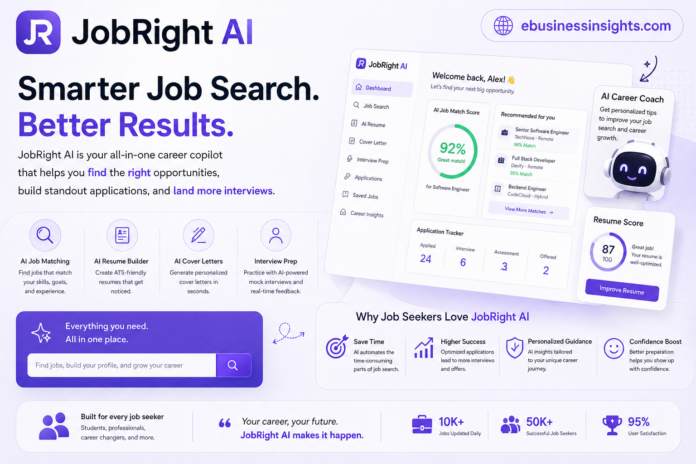
Jobright AI is a job search platform that uses AI to:
- Match you with relevant job listings
- Analyze your profile or resume
- Tailor your application materials
- Help you optimize for ATS systems
So instead of:
“Here’s a template, good luck”
It’s more like:
“Here are roles that fit you—and here’s how to position yourself for them.”
That shift matters.
⚙️ How Jobright AI Works (Without the Jargon)
Here’s how the flow typically looks:
- You upload your resume or input your experience
- The system analyzes your skills and background
- It recommends jobs based on fit
- It helps tailor your resume and applications for each role
Sounds straightforward—and it is.
But what surprised me was how much the matching part changes the experience.
Instead of scrolling endlessly through job boards…
You start seeing roles that actually make sense.
🔥 Key Features (What Actually Makes a Difference)
1. Smart Job Matching (More Important Than It Sounds)
Most platforms rely on keywords.
Jobright AI goes a bit further by analyzing:
- Skills
- Experience
- Role alignment
From what I’ve seen, it reduces that feeling of:
“Why am I even seeing this job?”
It’s not perfect—but it’s noticeably better than generic job boards.
2. Resume Optimization for Each Role
This is where it gets practical.
Instead of one static resume, you get:
- Tailored suggestions
- Keyword alignment
- Role-specific adjustments
And here’s the honest truth:
This is exactly what people should be doing manually—but rarely do.
3. Application Efficiency
If you’ve ever applied to multiple roles, you know how repetitive it gets.
Jobright AI reduces that friction.
Not by fully automating everything—but by:
- Speeding up customization
- Reducing manual edits
It doesn’t remove effort—but it removes wasted effort.
4. ATS Awareness
This is one of those things people underestimate.
Most resumes fail before a human even sees them.
Jobright AI tries to align your application with:
- ATS-friendly formatting
- Relevant keywords
It’s not magic—but it increases your chances of getting through the first filter.
🧩 Real-World Use Cases
Let’s look at how different people might actually use Jobright AI.
1. Recent Graduates
You don’t have much experience.
You’re not sure what roles fit you.
Jobright AI helps by:
- Suggesting relevant entry-level roles
- Guiding resume positioning
It reduces guesswork.
2. Career Switchers
This is where things get interesting.
Switching careers is hard because:
- Your experience doesn’t “fit” neatly
- Recruiters don’t always connect the dots
Jobright AI helps reframe your experience.
Not perfectly—but better than doing it blindly.
3. Busy Professionals
If you’re applying while working full-time:
- You don’t have hours to tailor each resume
- You need efficiency
This tool helps compress that process.
4. High-Volume Applicants
If you’re applying to many roles:
- Speed matters
- Consistency matters
Jobright AI helps maintain both.
⚖️ Pros and Cons (Balanced View)
✅ Pros
- Better job matching than generic platforms
- Saves time on resume customization
- Helps with ATS optimization
- Reduces repetitive application work
❌ Cons
- Not fully accurate in matching every role
- Still requires human review and edits
- Can feel “formulaic” if overused
- Doesn’t guarantee interview success
Here’s the honest truth:
It improves your process—but doesn’t replace it.
🔍 Comparison: Jobright AI vs Other Tools
Jobright AI vs Teal
Teal is known for:
- Job tracking
- Resume building
- Organization
Key Differences:
- Teal:
- Better for managing applications
- Less focused on AI-driven matching
- Jobright AI:
- Stronger job matching
- More automation in tailoring
Takeaway:
Teal helps you stay organized.
Jobright helps you apply smarter.
Jobright AI vs Kickresume
Kickresume focuses on:
- Resume design
- Templates
- Basic AI writing
Key Differences:
- Kickresume:
- Better for creating polished resumes
- Less strategic job targeting
- Jobright AI:
- More focused on matching and optimization
- Less about design
Takeaway:
Kickresume helps you look good.
Jobright helps you aim better.
🎯 Who Should Use Jobright AI (And Who Shouldn’t)
👍 Best For:
- Job seekers applying to multiple roles
- People who struggle with resume tailoring
- Career switchers needing guidance
- Anyone wanting a more strategic approach
👎 Not Ideal For:
- People applying to very niche roles
- Those expecting fully automated job applications
- Users who prefer manual control
If I’m being real…
This tool is most useful when you’re overwhelmed—not when you already have a clear, targeted plan.
⚠️ Limitations & Non-Obvious Truths
1. AI Can Flatten Your Voice
If you rely too much on AI suggestions:
- Your resume can start sounding generic
- You lose personal tone
That’s a real risk.
2. Matching Isn’t Perfect
Even with AI, job fit is complex.
You’ll still see:
- Irrelevant roles
- Slight mismatches
So don’t blindly trust recommendations.
3. It Can Create False Confidence
This is subtle but important.
Just because your resume is “optimized” doesn’t mean:
- It’s compelling
- It stands out
You still need strong storytelling.
💰 Is Jobright AI Free to Use?
This is a big question.
Yes—Jobright AI typically offers a free version, but with limitations.
Free plan usually includes:
- Basic job matching
- Limited resume optimization
- Access to core features
Paid plans unlock:
- More advanced matching
- Deeper customization
- Higher usage limits
From what I’ve seen:
You can test the platform properly for free.
But if you’re applying seriously, you’ll likely hit limits.
🔐 Is Jobright AI Trustworthy?
Short answer: Generally, yes—but with normal precautions.
It operates like most modern AI tools:
- You upload your resume
- It processes your data
So the usual rules apply:
- Don’t upload highly sensitive personal info unnecessarily
- Use trusted platforms only
From a functionality perspective, it behaves as expected.
But like any AI tool, it’s only as trustworthy as how you use it.
❓ Do Employers Know If You Used AI for Your Resume?
This is one of the most common concerns.
Here’s the honest answer:
No—employers don’t directly know.
There’s no “AI detection flag” for resumes.
But…
They can notice:
- Generic phrasing
- Over-polished language
- Lack of personal detail
So while AI use isn’t visible…
Its effects can be.
That’s why editing and personalizing your resume is critical.
🛠️ Practical Tips to Get the Most Out of Jobright AI
1. Don’t Copy Outputs Directly
Use AI suggestions as:
- A starting point
- Not the final version
2. Focus on Relevance Over Volume
Better to apply to:
- 10 well-matched roles
Than:
- 50 random ones
3. Add Your Voice Back In
After AI optimization:
- Rewrite parts in your own tone
4. Double-Check Every Application
Always:
- Review
- Adjust
- Personalize
🎯 Final Verdict: Is Jobright AI Worth It?
Here’s my honest take:
Jobright AI isn’t a magic solution.
But it is a meaningful upgrade to how most people approach job searching.
It:
- Improves targeting
- Saves time
- Adds structure
But it also:
- Requires judgment
- Needs personalization
- Won’t guarantee results
If you use it thoughtfully, it can give you an edge.
If you rely on it blindly, it won’t.
❓ Final Thought
If AI can help you apply smarter…
Would you trust it to shape your career—or keep doing everything manually?
Related Article: Freed AI

