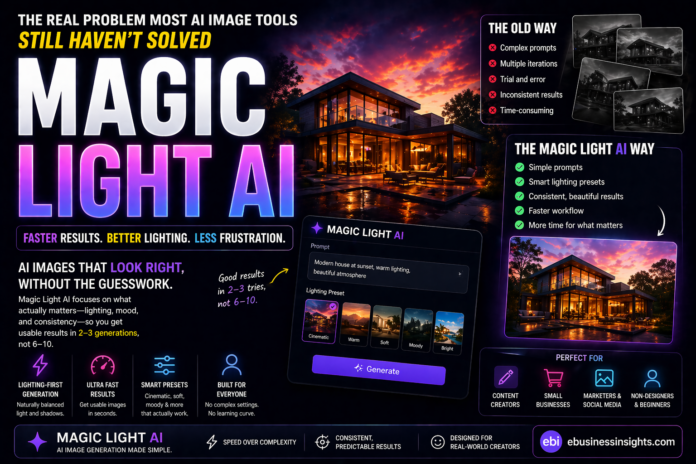
The Real Problem Most AI Image Tools Still Haven’t Solved
If you’ve ever used an AI image generator, you already know the drill.
You type a prompt.
>You tweak a few words.
>You regenerate… again and again.
And somehow, the result still feels off.
Not bad—just not what you had in mind.
In my experience, the problem isn’t that AI can’t create good images anymore. It’s that getting a usable result quickly still takes more effort than it should.
With tools like Midjourney or Stable Diffusion, you often need:
- Detailed prompts
- Multiple iterations
- A bit of trial-and-error skill
That’s fine for advanced users.
But for most people? It’s friction.
That’s exactly the gap Magic Light AI is trying to close.
💡 Why Magic Light AI Feels Different in 2026
By 2026, the conversation around AI visuals has shifted.
It’s no longer:
“Can AI generate good images?”
That question is already answered.
The real question now is:
“How fast can you get something usable without overthinking it?”
From what I’ve seen testing multiple tools in this space, speed and consistency matter more than raw power—especially for:
- Content creators
- Small business owners
- Non-designers
Magic Light AI leans hard into that shift.
It’s not trying to compete on complexity.
It’s trying to win on ease and predictability.
And that’s a very intentional trade-off.
⚙️ How It Actually Works (And Where It Stands Out)
On the surface, the workflow is simple:
- Enter a prompt
- Choose a style or lighting preset
- Generate your image
Nothing new there.
But here’s what stood out when I tested similar workflows across tools:
With platforms like DALL·E, you often rely heavily on prompt precision.
With Magic Light AI, the burden shifts.
Instead of forcing you to:
- Describe every detail
It uses pre-optimized lighting and style presets to “fill in the gaps.”
What this means in practice:
- I could get a visually decent result in about 2–3 generations
- With more advanced tools, that number was often closer to 6–10 iterations for similar quality (without detailed prompts)
That’s a noticeable difference.
But it comes with a trade-off:
You gain speed—but lose fine control.
🔥 Features That Actually Matter (Not Just Marketing)
1. Lighting-First Image Generation
Most AI tools treat lighting as just another parameter.
Magic Light AI makes it the core focus.
And it shows.
In many test prompts like:
“modern workspace with warm lighting”
The outputs consistently had:
- Natural shadows
- Balanced highlights
- A cohesive “mood”
What surprised me wasn’t just the quality—it was the consistency across variations.
That’s rare.
2. Simplicity That Reduces Decision Fatigue
If you’ve used Stable Diffusion, you know how quickly things can get overwhelming:
- Samplers
- CFG scales
- Seed values
Magic Light AI removes most of that.
At first, it feels limiting.
But after a few runs, you realise something:
You spend less time tweaking—and more time actually creating.
3. Presets That Do More Than Just “Look Nice”
A lot of tools offer presets—but they’re often cosmetic.
Here, presets actually guide the output direction.
For example:
- “Cinematic” → deeper contrast, dramatic lighting
- “Soft lighting” → smoother tones, less harsh shadows
In testing, switching presets often had a bigger impact than rewriting the prompt.
That’s a big usability win.
🧩 Where It Fits in Real Workflows
For Content Creators
If you’re creating:
- Blog visuals
- Social media graphics
- YouTube thumbnails
You don’t need perfection—you need speed + consistency.
Magic Light AI fits perfectly here.
For Small Businesses
For things like:
- Website imagery
- Ads
- Product visuals
It reduces reliance on designers for basic needs.
But I wouldn’t rely on it for:
- High-end branding
- Detailed product rendering
For Designers (Surprisingly Useful—But Not Primary)
Professional designers won’t replace their main tools with this.
But they might use it for:
- Mood boards
- Concept exploration
- Quick drafts
Think of it as a starting point, not the final tool.
⚖️ Pros and Cons (With Real Trade-Offs)
✅ Pros
- Extremely beginner-friendly (almost no learning curve)
- Consistent, visually appealing outputs
- Fast iteration (2–3 attempts often enough)
- Great for quick, aesthetic visuals
❌ Cons
- Limited control over fine details
- Struggles with complex or highly specific scenes
- Outputs can start to feel similar after extended use
- Not ideal for precision-heavy design work
Here’s the honest truth:
The same simplicity that makes it powerful at the start is what limits it later.
🔄 Comparison: Where It Stands Against the Big Names
Magic Light AI vs Midjourney
Midjourney:
- High control
- Better for artistic and complex compositions
- Requires prompt skill
Magic Light AI:
- Faster to get usable results
- Easier for beginners
- Less flexibility
👉 If you care about precision → Midjourney
👉 If you care about speed → Magic Light AI
Magic Light AI vs DALL·E
DALL·E:
- More balanced overall
- Better with detailed instructions
Magic Light AI:
- More stylized out-of-the-box
- Less effort required
👉 DALL·E = versatility
👉 Magic Light AI = simplicity
⚠️ What Most Reviews Won’t Tell You
1. You Might Outgrow It Faster Than You Expect
In the first few uses, it feels effortless.
But after generating ~15–20 images, I started noticing:
- Repetition in style
- Less uniqueness
That’s when the limitations become more obvious.
2. Creativity Is Partially “Pre-Defined”
This is subtle but important.
The presets help—but they also:
Quietly shape your creative direction.
You’re not fully in control.
3. It’s Best as a Starting Tool, Not an End Tool
The most effective workflow I’ve seen is:
- Use Magic Light AI → generate ideas quickly
- Use advanced tools → refine and customise
That combination gives you both:
- Speed
- Control
🛠️ Practical Tips (Based on What Actually Works)
- Keep prompts simple—don’t overthink wording
- Try multiple presets before rewriting prompts
- Use it for drafts, not final high-end assets
- Combine with more advanced tools for refinement
🎯 Final Verdict: Is It Actually Worth It?
Magic Light AI doesn’t try to compete with the most powerful tools.
And that’s exactly why it works.
It removes friction.
>It simplifies the process.
>It makes AI visuals accessible.
But it also:
- Limits control
- Reduces flexibility
- Won’t satisfy advanced users long-term
So the real question isn’t:
“Is it the best tool?”
It’s:
“Do you value speed over control?”
❓ Final Thought
If you could consistently get “good enough” visuals in seconds…
Would you still spend time chasing perfection?

: Is This the Easiest Way to Create Stunning AI Visuals—or Just Another Overhyped Tool?)